Practical answer
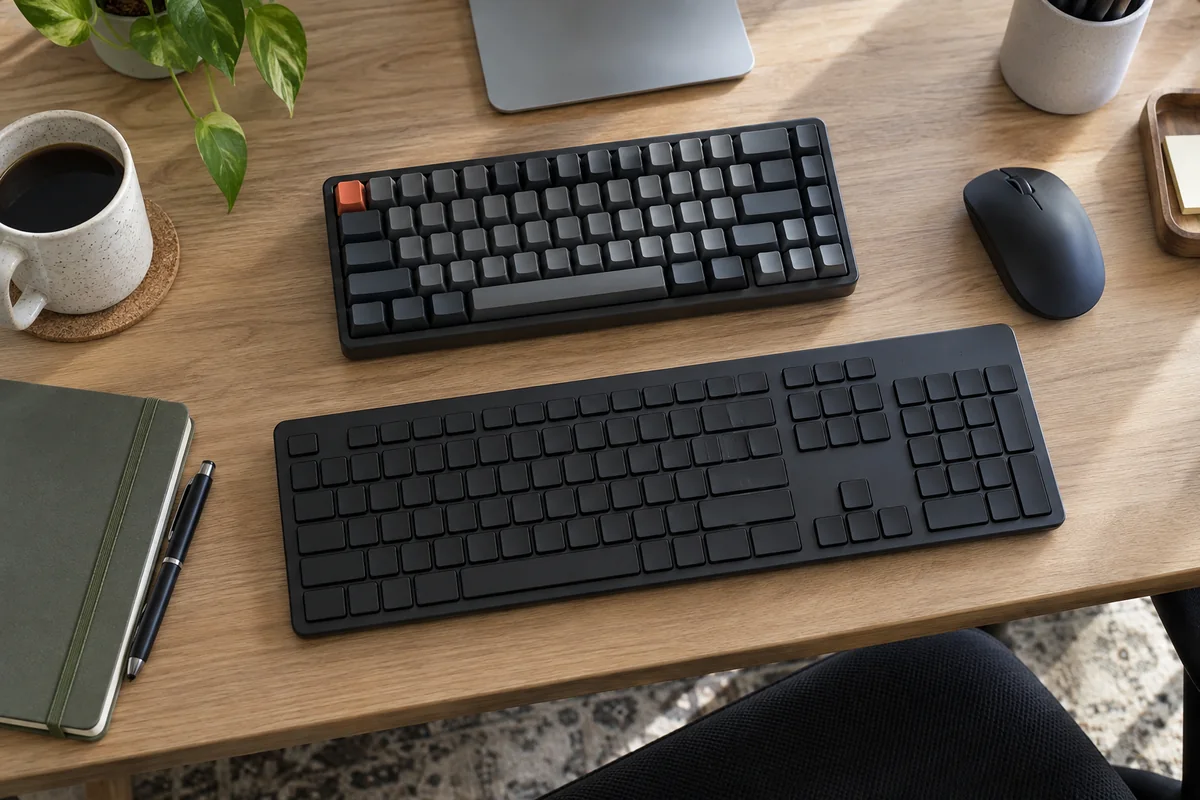
A full-size keyboard keeps the integrated number pad and is the simpler choice for frequent numeric entry. A tenkeyless keyboard removes that pad, reducing width so the mouse can sit closer to the body. The better office layout depends on actual number-entry time, mouse reach, shortcuts, handedness and available desk width.
Do not decide from the key count alone. Compare the navigation cluster, key spacing, wireless controls and software support on the exact models. Compact labels are not perfectly standardized across manufacturers.
- Measure keyboard plus mouse width
- Audit number-pad use for a week
- Check the exact navigation layout
- Consider a separate keypad
Choose by repeated task
| Work pattern | Full-size advantage | Tenkeyless advantage |
|---|---|---|
| Accounting or numeric entry | Integrated keypad is always ready and position is consistent | Only if number entry is occasional or a separate keypad works better |
| Writing and browsing | No layout change for users who already prefer it | More room to place the mouse near the keyboard |
| Spreadsheets | Fast keypad entry for number-heavy sheets | Better only when shortcuts and top-row numbers cover the workflow |
| Small desk or keyboard tray | May crowd the pointer or extend beyond the tray | Smaller combined input footprint |
| Shared or hybrid work | Familiar complete layout | Easier to carry, but verify missing or remapped keys |
Run a one-week layout audit
- Measure the current keyboard width and the distance from its home position to the mouse.
- Record each task that genuinely uses the number pad rather than the top number row.
- Note whether the mouse arm reaches outward or whether the keyboard is shifted off center to make room.
- List required navigation, function and shortcut keys in the work applications.
- Try repositioning the current keyboard and mouse before attributing every reach problem to layout.
- If both needs matter, test a detachable keypad that can move to either side or be stored.
Check details hidden by the layout name
- Exact width, key spacing and case border.
- Whether Insert, Delete, Home, End, Page Up and Page Down remain dedicated.
- Function-row behavior and whether software is required for remapping.
- Receiver, Bluetooth and switching support on managed work computers.
- Keyboard height and angle after any wrist or palm support is added.
Questions people ask
Does TKL always mean 87 keys?
87 keys is a common U.S. TKL layout, but regional and manufacturer layouts vary. Verify the exact key map rather than buying from the label.
Is a TKL keyboard more ergonomic?
It can allow a closer mouse position, but keyboard height, angle, placement, key force and work pattern still matter. No layout is universally ergonomic.
Can a separate number pad replace full-size?
For some workflows, yes. It can be placed only when needed or on the preferred side, but it adds another device, connection and storage requirement.
Sources and methodology
These sources support the setup logic and boundaries above. Check product-specific instructions before making a purchase or changing electrical equipment.
- Workstation Components - Pointer/Mouse — U.S. Occupational Safety and Health Administration ↗Official guidance to keep the pointer close and consider a keyboard without a ten-key pad when reach is a problem.
- Workstation Components - Keyboards — U.S. Occupational Safety and Health Administration ↗Keyboard placement, height, angle and reach guidance.
- Tenkeyless keyboards: benefits and setup — Logitech ↗Manufacturer explanation of the common 87-key versus 104-key layout distinction.